As we enter 2026, the digital landscape in India has changed significantly. The National Education Policy (NEP 2020) is now fully integrated into most CBSE, ICSE, and State Board schools. “Tech Literacy” is no longer just an optional activity; it is a critical skill for the next generation.
For parents, this creates a common dilemma on robotics vs coding for kids—which one is the better starting point?
Should your child spend weekends building physical machines that move, or should they explore the logic of software and app development? In this guide, we will outline the differences, costs, and cognitive benefits to help you decide on the best foundation for your child’s future. Understanding the nuances of robotics vs coding for kids is the first step in this journey.
Table of Contents
1. Introduction: The 2026 Tech Landscape for Indian Students
In the current educational climate, Indian students are expected to be creators rather than just consumers of technology. Whether it’s the rise of AI-driven startups in Bangalore or the integration of Atal Tinkering Labs (ATL) in schools across the country, the pressure to choose the “right” skill is real.
However, the choice shouldn’t be about what’s trending, but about what builds the strongest cognitive foundation. In 2026, we see a massive shift toward “Physical Computing”—where software meets the real world. This is why understanding the nuances between pure coding and integrated robotics is more important than ever.
2. What is Coding? Understanding the Language of Software
At its simplest, coding is the process of giving a computer a set of instructions to perform a task. It is the “brain” behind every app, website, and video game.
In 2026, coding for kids has evolved from boring syntax to visual, gamified experiences. Platforms like Scratch, Blockly, and even child-friendly Python environments allow kids to build complex digital worlds using logic alone. When a child learns to code, they are mastering the art of abstract problem-solving. They learn how to think in loops, variables, and “if-then” statements—the building blocks of all modern technology.
3. What is Robotics? The Intersection of Hardware and Logic
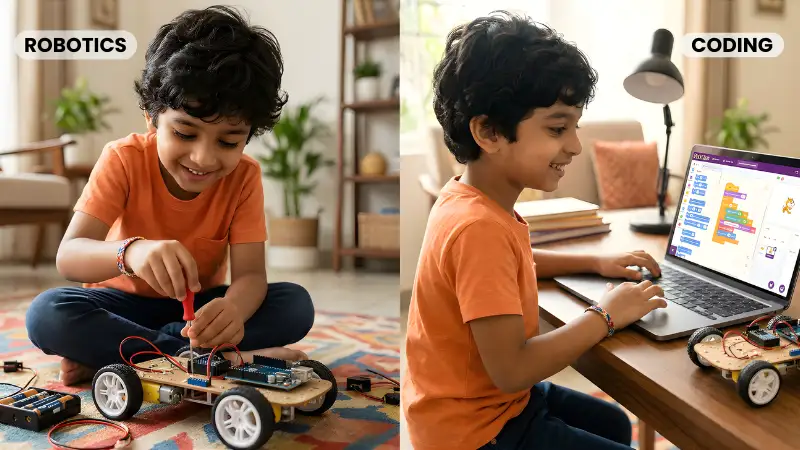
While coding is about software, robotics is about the integration of software and hardware. Robotics involves designing, building, and then programming a physical machine to interact with the real world.
A robot needs four core components:
- The Body (Mechanics): The physical frame, gears, and wheels.
- The Nerves (Sensors): Components that detect light, sound, or distance.
- The Brain (Code): The instructions that tell the robot how to react to sensor data.
- The Muscles (Actuators): Motors that move the robot’s limbs or wheels.
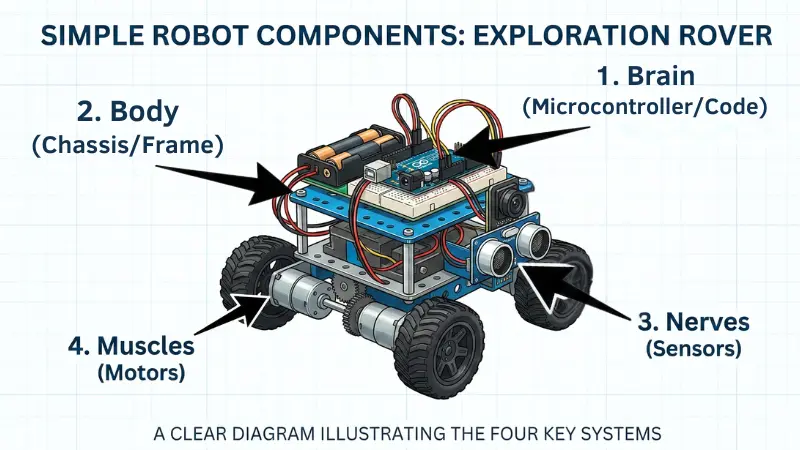
This makes robotics a multi-disciplinary field that covers physics, engineering, and electronics alongside programming.
4. Key Differences: Tangible Results vs. Digital Creation
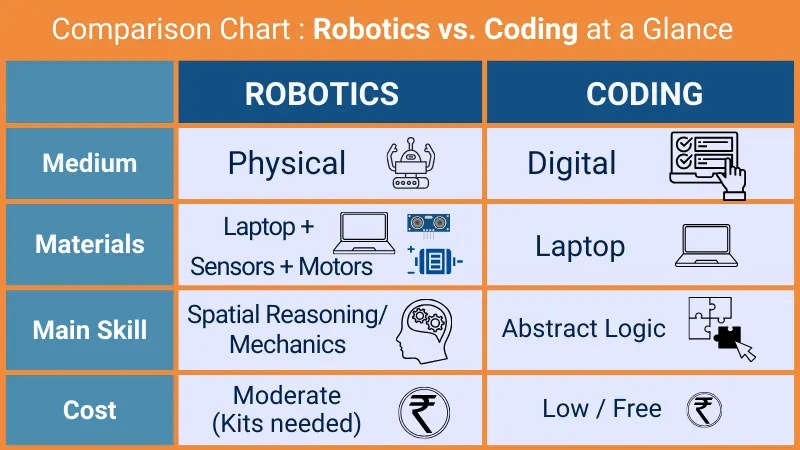
In Robotics vs Coding for Kids, the biggest difference lies in the output and interaction:
- Coding: The result is on a screen. It offers infinite creative freedom without the cost of physical materials. A child can build a sprawling 3D world in Minecraft or a complex app without spending a rupee on hardware.
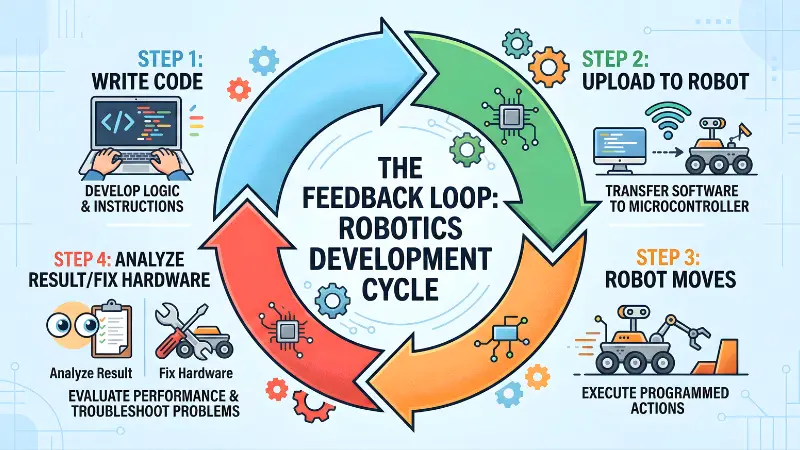
- Robotics: The result is in the child’s hands. It’s a car that avoids obstacles or a robotic arm that picks up a ball. The feedback is physical and immediate. If the robot falls over, it’s a gravity problem. If it doesn’t move, it might be a battery problem. This adds a layer of mechanical troubleshooting that coding lacks.
5. Learning Logic vs. Mechanics: Why Robotics Offers a Balanced Approach
One of the most frequent questions parents ask is about learning logic vs. mechanics.
- Coding is pure logic. It teaches “Computational Thinking”—how to break a massive problem into small, logical steps. It is highly efficient for developing mathematical reasoning.
- Robotics takes that logic and applies it to the physical world. If the code says “turn 90 degrees” but the robot’s wheels are misaligned or the floor is too slippery, it won’t work.
This teaches children that in the real world, logic must account for physical constraints like friction, weight, and battery life. It builds a unique kind of resilience; children learn that “it’s not just the code that has to be right, the world has to be considered too.”
When comparing robotics vs coding for kids, we must look at how physical constraints change the logic.
6. Cognitive Benefits: Which One Sharpens the Mind Better?
Robotics vs Coding for kids, both disciplines offer incredible brain-boosting benefits, but they target different areas of development:
Benefits of Pure Coding:
- Improved Writing Skills: Surprisingly, the structure of code mimics the structure of an essay—intro, body, and conclusion.
- Abstract Reasoning: Thinking about things that don’t have a physical form.
- Focus & Concentration: Debugging a piece of code requires high levels of “deep work.”
Benefits of Robotics:
- Spatial Awareness: Understanding how objects move through 3D space.
- Fine Motor Skills: Assembling small gears and sensors develops hand-eye coordination.
- Teamwork: Most robotics projects are collaborative, unlike coding which can often be a solitary activity.
7. Is Coding Better Than Robotics for Early Learners?
Many parents ask, is coding better than robotics? The truth is, it depends on your child’s natural inclination:
- Choose Coding First if: Your child loves storytelling, digital art, or is obsessed with how video games are made. If they spend hours drawing or creating digital stories, they will enjoy the infinite canvas of a coding environment. It also requires less physical space and zero hardware costs to start.
- Choose Robotics First if: Your child is a “builder.” If they love LEGO, enjoy taking things apart to see how they work, or prefer tactile learning, robotics will keep them engaged much longer than a screen. For children with high energy who struggle to sit still in front of a computer, robotics is the perfect bridge.
8. Comparing the Cost of Robotics vs Coding for Kids in India
In India, the barrier to entry for coding is very low. Most schools now have computer labs, and any basic laptop can run Scratch or Python.
Robotics, however, requires an investment in hardware.
- Coding: Costs ₹0 if you have a computer.
- Robotics: Beginner kits can range from ₹1,500 for basic DIY sets to ₹30,000 for advanced LEGO or VEX systems.
- The Middle Ground: Many parents in 2026 are opting for Arduino or Raspberry Pi kits, which are affordable and widely available on Indian e-commerce sites, offering a pro-level experience at a fraction of the cost.
9. The Synergy: Why Learning Both is the Ultimate Goal
In the 2026 job market, the debate over robotics vs coding for kids shifts from competition to collaboration. From India’s growing drone delivery networks to automated smart homes in “Smart Cities,” every major innovation requires both skills. The best stem skills for children are developed when they understand that code (the thoughts) and robotics (the actions) must work together.
By learning robotics, a child naturally learns to code. However, by only learning to code, they may never understand the beauty of mechanical engineering. Mastering the balance of robotics vs coding for kids ensures they are prepared for the multidisciplinary challenges of the future.
10. Age-Appropriate Starting Points: When to Introduce Each
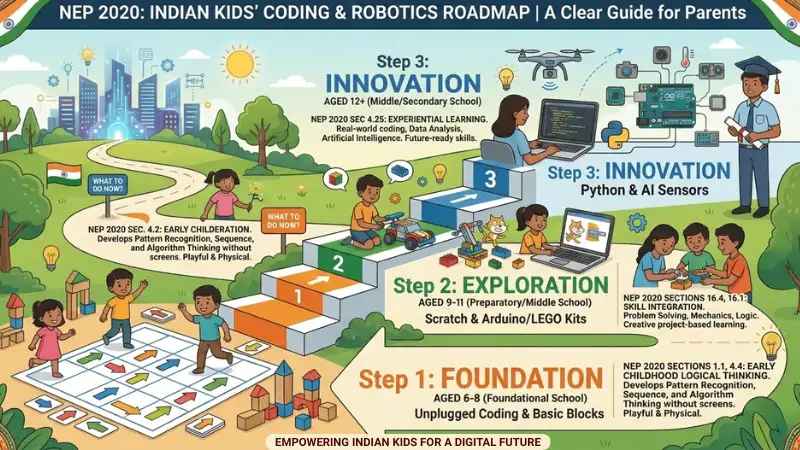
Following the NEP 2020 guidelines and global STEM standards, here is how you can introduce different types of Microcontrollers, coding and platforms based on your child’s age and available devices:
- Ages 6–8 (Foundational): Start with “Unplugged” coding (logic games, puzzles) and simple mechanical building sets. Avoid screens where possible to develop motor skills first.
- Ages 9–11 (Middle): Introduce block-based coding (Scratch) alongside beginner-friendly robotics kits. This is the “Golden Age” for robotics where interest is highest.
- Ages 12+ (Secondary): Transition to text-based languages like Python and advanced robotics involving AI, machine learning, and sophisticated sensors.
11. Top Microcontrollers & Desktop/Laptop/ Mobile Coding Apps for Kids’ Robotics in India (2026)
| Microcontroller Board | Approx. Cost in India | App / Platform | Coding Type | Device Support | Suitable Age | Skill Level | Key Feature for Kids (App / Platform) |
| BBC micro:bit (V2) | ₹1,800 – ₹2,200 | MakeCode | Block & Text | Android (Browser) & Desktop | 8 to 12 | Easy | Has a built-in virtual simulator; kids can test code before uploading. |
| Scratch | Block Only | Desktop (Browser) | 8 to 12 | Easy | Highly gamified and familiar to kids who already learn Scratch in school. | ||
| Arduino UNO (Clone) | ₹350 – ₹500 | PictoBlox | Block & Python | Android (App via OTG) & Desktop | 10+ | Easy | Made in India! Features amazing AI extensions and works directly from a phone. |
| mBlock | Block & Python | Android (App via OTG) & Desktop | 10+ | Easy | Simple drag-and-drop hardware control; great bridge to Python. | ||
| Arduino IDE | Text (C++) | Desktop Only | 12+ | Tough | The industry standard. Teaches real-world engineering and syntax. | ||
| ArduinoDroid | Text (C++) | Android (App via OTG) | 12+ | Tough | Allows teens to write and upload raw text code without needing a PC. | ||
| ESP32 (Wi-Fi Board) | ₹350 – ₹500 | PictoBlox | Block & Python | Android (App) & Desktop | 11+ | Moderate | The easiest way to learn how to make Bluetooth remote-controlled cars. |
| Arduino IDE | Text (C++) | Desktop Only | 13+ | Tough | Best for advanced teens wanting to build “Smart Home” IoT gadgets. | ||
| Raspberry Pi Pico / Pico W | ₹350 – ₹650 | Thonny IDE | Text (MicroPython) | Desktop Only | 12+ | Moderate | The absolute best platform for kids to learn real Python programming on hardware. |
| Arduino IDE | Text (C++) | Desktop Only | 13+ | Tough | Allows advanced students to use the massive Arduino C++ library ecosystem. |
12. Which Microcontroller Should You Buy for Your Child’s Robot?
- For Kids Under 10: Buy the BBC micro:bit. It is more expensive upfront, but it has sensors, a microphone, and an LED screen built right into the board. Your child can start coding games and logic on day one without worrying about messy wires or burning out small parts.
- The Best All-Rounder (Ages 10+): Buy the Arduino UNO. It is cheap, indestructible, and the backbone of 90% of school robotics projects in India. Pair it with the mBlock app, and your child can program it using simple drag-and-drop blocks.
- For the Wireless Wizard (Ages 13+): If your teen wants to build a robot they can control with their Android phone, grab an ESP32. It has built-in Bluetooth and Wi-Fi, making it the king of modern DIY Smart Home and IoT (Internet of Things) projects.
13. Frequently Asked Questions (FAQ)
Is robotics harder than coding?
Not necessarily. While robotics has more “moving parts” (hardware + software), many kids find it easier to stay engaged because the results are physical. Coding requires more abstract thinking, which can sometimes be more challenging for younger children.
Does my child need to be a math genius to start?
Absolutely not! Both disciplines actually help kids understand math better by applying it to real-world problems. They learn about angles, distance, and logic through play, making school math feel much more relevant.
Can we learn robotics without a laptop?
Yes! With apps like PictoBlox or ArduinoDroid and a simple USB OTG adapter, you can program many microcontrollers directly from an Android phone or tablet.
What is the right age to start?
According to NEP 2020 guidelines, , children can start “unplugged” logic games as early as age 6. So, when considering robotics vs coding for kids, the best age to start hands-on robotics with simple boards like the micro:bit is perfect for ages 8 and up.
Will learning robotics help with school exams?
Yes. It builds critical thinking, problem-solving, and time-management skills. Many Indian schools now incorporate STEM projects into their internal assessments.
14. Conclusion: Choosing the Best Foundation
There is no “wrong” choice, but there is a “better” starting point based on your child’s curiosity. While coding builds a strong foundation in abstract logic, robotics provides the thrill of seeing that logic come to life in the physical world.
Our Recommendation for 2026: For younger children (under 10), we strongly suggest starting with robotics. The physical feedback makes the learning curve much “stickier” and significantly reduces “screen-time fatigue”—a growing concern for Indian parents. Once they are hooked on making things move, the transition to advanced coding will happen naturally and with much more enthusiasm!
Ultimately, the choice of robotics vs coding for kids depends on your child’s unique personality.
If you are just starting out, don’t forget to check our previous guide on What is Robotics STEM Education for kids and 10 Powerful Benefits of Robotics for Kids in India
Ready to start your child’s journey? Stay tuned for our next post, where we show you how to create a DIY Robotics Lab at home for under ₹2,000!

Samir Sen is a retired Indian Railways Signalling Engineer with over 30 years of experience in railway signalling systems and safety operations. He also served as a faculty member at a Zonal Signalling Training Institute of Indian Railways, delivering theoretical and practical training in signal engineering. Through SSEN Techno, he simplifies robotics and STEM education for learners and beginners.